Friday, October 14, 2011

Emergency Incident with Online San Francisco Map Presentation

Scenario

Around 3:00am on May 15, 2003, a tractor trailer carrying 20,000 pounds of hazardous material overturned in downtown San Francisco. The CA state Police and local emergency responders both responded at the site to coordinate the accident response. In As City Planner for the city of San Francisco you have been asked to create maps for the police department as well as the local public in order to better aid in the evacuation efforts.
Problem

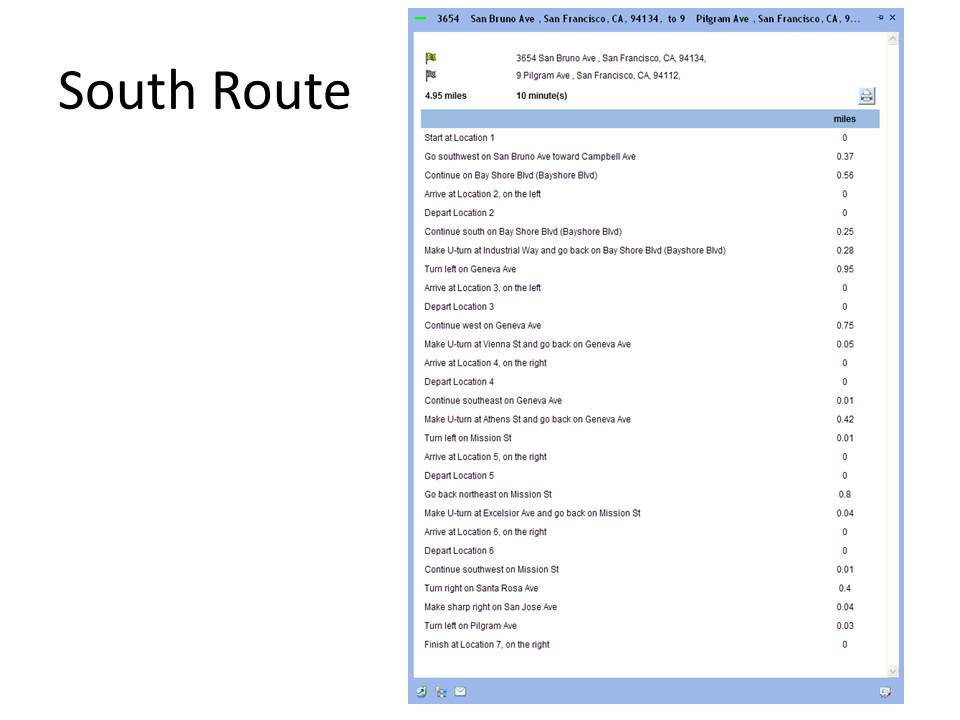
California state police arrived first and recorded the location with GPS receivers and identified the substance as hazardous. Officers needed maps showing the vulnerable area surrounding the accident and estimate of the population an households that needed to be evacuated, suggestions for possible shelters for the evacuees, and a traffic analysis designating detours for vehicles. The analysis also includes suggestions for helicopter landing site both for the medevac and to transport support personnel. The helicopter landing sites are near the Incident and Evacuation Zone.

The public also needs to have readily available maps so they can determine where to and not to go.  If they are within the Buffer Zone then they need to know where the nearest shelters-in-place are located and how to get there.

The Deliverables
           ArcGIS Network Analyst slide presentation online (this link is being edited)

Wednesday, August 3, 2011

Weighted Location for Parents Move to Collier County FL

Abstract “GIS is used to analyze potential markets within Collier County that make up Naples and surrounding area. A raster-based, weighted model along with demographic data were used to find the ideal location(s) for simultaneously isolating the optimal residential locations with their other requirements. It was determined that a single tract (000400) within collier county met the weighted requirements as defined by the customer. ”Zielsdorf

These requirements included: Catholic churches, predominately white, middle income, hospitals, and community centers. This final model can be adjusted and used in the future to find secondary locations for additional marketing or replan efforts

An in depth interview of a couple who are planning on moving to the moderate climate off the coast of Florida. The analysis focused on their desires and the various requirements were weighted based on their specific inputs

Final Analysis
County Tract 000400 around Naples meets exceeds every requirement levied by the Murphy’s. Having visited Naples, interviewed my parents, studied the data and run the analysis, the result is something they could use to make a very well informed decision. They are typical customers and have been asking about further refinements upon seeing the data and seeing the possible opportunities and options they never knew existed. That is exactly what should happen.

Introduction
Choosing a place to live is a complicated decision influenced by many factors. One needs to balance personal preferences with work, budget, and family constraints. In this exercise, we made decisions about where to live using demographic data, property information, and such spatial factors as proximity to important landmarks. The preferences are prioritized by giving some factors more weight than others.

A key use of GIS in many businesses is to support decision making, such as where to site new locations. Deciding where to locate a business comes from weighing a variety of factors, such as population density, income level, distance from competitors, traffic, etc. One of the challenges is to decide what weight (prominence) to give the various factors. In this week’s activity, I use weighted overlays in ArcGIS making this task fairly simple. Before moving on, brainstorming the factors that might go into a particular location decision (e.g., where to build a new school or rent an apartment near a college) and consider how one may weight each of these factors.

An in depth interview of an elderly couple (my parents, Mark and Annie Murphy) who have decided to look for a new place to live since Mr. Murphy had brain surgery 2 years ago and never regained full physical control. It is now and most likely will always be difficult for him to walk without a cane or walker. This situation has also been very hard on Mrs. Murphy, who suddenly had to take the reins for managing the business and all the medical issue that come with being an octogenarian couple. So they are considering moving to a warmer climate, such as Naples FL, that will be conducive to a better life and better health care. There is a retirement community that specializes in serving those with prior military service. Since Dad is a proud former member of the Army Special Forces, this type of community would beneficial. Mr. and Mrs Murphy stated that they want to be able to visit their children regularly and vice versa so proximity to Amtrak or an Airport is important. There is one Rehabilitation center in Naples that has the necessary requirements. They are both outdoors people so that was also included in the evaluation.

Key Stakeholders – The key stakeholders are Mr. and Mrs Murphy, children, Children’s spouses, and grandchildren. 
 
Key Benefit – The key benefit to Mr. and Mrs Murphy will be a better and more robust living situation.

Objectives – The objectives for the Location Decisions Collier County - The GIS expert needs to find a site with the required characteristics as defined by the clients. In this case they want: http://www.gsd.harvard.edu/gis/manual/raster/index.htm  Catholic churches, predominately white, middle income, hospitals, and community centers.

Once potential areas are outlined, we will turn them into individual zones with the RegionGroup function and then create several other surfaces that will be used to evaluate the potential sites.

Refinements
This case study in the Naples area can be continually refined to include locations grocery stores, cleaners and other shops within walking distance. It can be further refined to consider bulk food stores such as Wal-Mart and Costco since they have stated that they currently shop at these and similar stores
Objective 1 – Gather the necessary data evaluation
Objective 2 – Calculate Euclidean distance from the following criteria established by the client
  • Location close to Naples Regional Medical Center
  • Location close to the Total Back Care Center
  • A neighborhood with a high percentage of people 65 years old +
  • A neighborhood with high White population
  • Near Major Transit (Airport, Train, Major Roads)
Objective 3 – Conduct a weighted analysis based on the client’s preference to live near the following locations considering various priority levels:
  • Rehab Center and hospitals
  • Hospital
  • Predominately White Christian population
  • Catholic Churches
  • Community centers
Objective 4 – Determine the best possible location to live based on Client’s criteria and analysis results.
Objective 5 - Create a meaningful set of maps, slides and documentation Clients can use for making smart decisions where to live based on their preferred criteria. They may choose this area or ask me to do another, either way it will be enlightening to think through the process and see the effects of their decisions.

Tools used for the Analysis.
The Primary tools that will be used are ESRI ArcGIS and MS office. Within ESRI’s ArcGIS the following tools will be used:
  • ArcMap
  • ArcCatalog
  • ArcGIS Spatial Analyst Extension
  • ArcGIS Model Builder
  • Euclidean distance tool
  • Feature to Raster tool
  • Join function
  • Clip tool
  • Data Export
  • Map Creator
Additionally, MS Office (Excel, Word, and PowerPoint) was also used in this analysis.

The general steps that will be taken to accomplish this lab are as follows:


Step 1: Create a base map of Collier County
Step 2: Calculate Euclidean Distance from Florida Rehab Medical Center
Step 3: Calculate Euclidean Distance from Catholic Church

Step 4: Create a Field for Percentage of Population 65+

Step 5: Convert Tracts to a Raster for Age Range and Reclassify

Step 6: Show locations of targeted Retirement Communities

Step 7: Create a Weighted Overlay with Each Factor Weighted evenly

Step 8: Create a Second Weighted Overlay based on their input

Step 9: Write a cogent analysis describing the differences between the two overlays
Final Analysis
County Tract 000400 around Naples meets exceeds every requirement levied by the Murphy’s. Having visited Naples, interviewed my parents, studied the data and run the analysis, the result is something they could use to make a very well informed decision. They are typical customers and have been asking about further refinements upon seeing the data and seeing the possible opportunities and options they never knew existed. That is exactly what should happen. For a power point presentation select Slides or Slides with Presentation Summary  for the full paper select Final Project Results

References
 a. Jenness, J. 2004. Weighted Mean of Points (weightmean.avx) Extension for ArcView 3.x, v. 1.2c. Jenness Enterprises. Found at: http://www.jennessent.com/arcview/weighted_mean.htm .

b. Dong, P. . (2008). Generating and updating multiplicatively weighted Voronoi diagrams for point, line and polygon features in GIS. Computers & Geosciences, 34(4), 411-421. Retrieved from http://linkinghub.elsevier.com/retrieve/pii/S0098300407001495  or http://www.sciencedirect.com/science/article/pii/S0098300407001495

c. Drobne, Samo; Lisec, Anka. (2009, November 1). Multi-attribute decision analysis in GIS: weighted linear Combination and ordered weighted averaging The Free Library. (2009). Retrieved July 19, 2011 from http://www.thefreelibrary.com/Multi-attribute decision analysis in GIS: weighted linear Combination...-a0216411796

Tuesday, July 12, 2011

Urban Planning: Location Decisions

Scenario

 
Choosing a place to live is a complicated decision influenced by many factors. One needs to balance personal preferences with work, budget, and family constraints. In this exercise, we made decisions about where to live using demographic data, property information, and such spatial factors as proximity to important landmarks. We prioritized the preferences by giving some factors more weight than others.

 
Background

 
Alachua County is a county located in the state of Florida (United States). The 2010 Census conducted by the U.S. Census Bureau reports a county population 247,336. The county seat is Gainesville, Florida, home of the University of Florida, and is also known for its diverse culture, local music, and artisans. Census 2000 reported 37.2% of Alachua County‘s workforce is related to education (Census.gov).

Analysis

First one has to examine the data, complete map documentation, and set the environments.  Then begin the analysis and to prepare the displays needed to address the problem. A good place to start any GIS analysis is to produce a locational or basemap to better understand the distribution of features in the geographic area being studied. A basemap of Alachua County showing places and federal lands.

The first analysis (Even Weight) is rather like asking my mother-in-law what she likes the best. She usually says that she “likes them all the same” which means we make basic set of decision now and their preferences surface later.
So divining, what the customers want at the beginning is very helpful since it at least provides a target. In this case we learn about the grandparents weighting of 40/40/10/10 percent. The weighting clearly shows the emphasis on their children and grandchildren.
The recommendation is really anywhere in the highlighted area (look at Weighted Results map). Most of the selected area is 3 to 5 miles from the children. The bus routes, take you right to the hospital, the school, and too the neighborhood. More refinement should be made after they visit some of the community centers. Also, they should look at the three areas (blue, red and yellow areas) to see what neighborhoods really strike their fancy. The grandparents can them make that target smaller/larger with more refinements on their needs. Note the choices above emphasized the proximity to the children’s home/Hospital and University and lessened the impact of age ratio and house values. There was only are that did not have any impact from either scenario. Notice that since the children live Near the Hospital, the proximity analysis works for either the children’s’ home or Hospital. That in effect eliminates the need for one map and simplifies the assessment.

 
A key use of GIS in many businesses is to support decision making, such as where to site new locations. Deciding where to locate a business comes from weighing a variety of factors, such as population density, income level, distance from competitors, traffic, etc. One of the challenges is to decide what weight (prominence) to give the various factors. In this week’s activity, I use weighted overlays in ArcGIS making this task fairly simple. Before moving on, brainstorming the factors that might go into a particular location decision (e.g., where to build a new school or rent an apartment near a college) and consider how one may weight each of these factors (1-10).

 
Learning objectives: Upon completion of this week’s activities, be able to:
  1. Explain how GIS is being used in urban and regional planning
  2. Describe how planners can use GIS
  3. Describe how a GIS enables demographic analysis
  4. Track changes to spatial features over time.
  5. Explain how land use and zoning plans are used to monitor existing urban activities
  6. Calculate Euclidean distance 
  7. Classify rasters using a defined interval 
  8. Calculate values using formulas 
  9. Convert features to rasters 
  10. Create a model and run various models 
  11. Use the weighted overlay process setting both scale and percentage
The connections for this week’s activities are the following:
  • Business, marketing
  • Public administration
  • Government
1.  Deliverable 1- A basemap of Alachua County including places, public lands, roads, and census tract the couple from project 1 chose to live within (given).
2.   Deliverable 2- (2 or 3maps) A single layout view showing a map of each of or a combination of the following parameters
      • Distance from grandkids (original couple’s location)
      • Distance from North Florida Regional Medical Center
      • Distance from University of Florida
      • Distance from Community Centers
      • Census tracts highlighting percentage of population Age 65 and up
      • Census tracts showing median house value
      • Bus routes
3.  Deliverable 3- A map showing two different weighted overlays.
  1. Process Summary (Student Worksheet): Explain your steps.
  2. Final Report for Grandparents/Clients


Monday, July 4, 2011

Base Map Application

Introduction

This is another example of how powerful and useful Local GIS maps are becoming.  The City of Naperville is still learning how to use this capability but they are also far ahead of most of the cities I have worked with.
The Local Government Basemaps template is a set of ArcGIS Map Documents that can be used to author the essential basemaps in a local government. The templates will help one to publish a series of high-quality basemaps using available authoritative content. These basemaps are the foundation for a variety of desktop, mobile and web mapping applications deployed throughout local government.  The General Purpose and Parcel Public Access basemaps at two different scales. 
The Local Government basemaps provide a consistent geographic context needed across all local government departments and agencies. They provide important reference information that supports daily decision-making. The basemaps orient map users and are typically combined with other map layers that represent operational information managed by a department and/or agency within local government. In some cases though, the basemaps themselves may serve as a finished product that can be used in a map atlas or other hardcopy product. 
 
I was not quite sure what was expected in the lab so I made a map from the base map created in this part of the lab.

Saturday, June 25, 2011

Homeland Security (Protect)

Deliverables:
  1. Process Summary (.doc)
    1. Explain your steps.
    2. Answer any questions (1) 
  2. Blog Post materials to your blog
  3. 3 Maps (JPEG) 
    1. Map of heliport.
    2. Map of ingress and egress points around heliport.Line of Sight
    3. Map with profile graph incorporated into it.  
    4. 1 JPEG (Exported from 3-D) 
    5. JPEG of 3-D line of sight 
  4. Power Point Presentation

Objectives: Upon completion of this lab students should be able to: 
  • Create a hillshade surface in ArcMap 
  • Create a new shapefile within ArcCatalog. 
  • View 3D data in ArcScene.
Section 2.1: Prepare Protect Scenario Map 1
In this scenario, a threat is made targeting the NORAD command center at Cheyenne Mountain. Due to the nature of this threat, the site is regarded as the primary critical infrastructure and a number of key resources in and around the site are considered secondary critical infrastructure
I. Add MEDS Data to Scenario Map
II. Create Buffer around Extended Area beyond Event Site

Section 2.2: Locate Critical Infrastructure
Locate those key resources within this zone that may be potential secondary targets. These sites will also require additional security measures to step up surveillance to monitor activities in and around them to prevent terrorists from staging secondary incidents that may threaten the safety of the people in the area.

  1. Select by Location (Completely Within) 
  2. Summarize Data in a Table  
Section 2.3: Protect Critical Infrastructure Maps 3 & 4

I. Create Protective Security Buffer Zone around Critical Infrastructure

Deliverable 1: Buffers of the Cheyenne Mt. Airport/Heliport
A map was created illustrating the buffer zone surrounding the Heliport within the larger buffer zone. Remember, we had an entire data set at our disposal. A reference map showing where in the U.S. this data was added. The military map template was used to implement this deliverable

  
Deliverable 2: SECURE INGRESS AND EGRESS ROUTES AROUND CRITICAL INFRASTRUCTURE
A map was created illustrating these points surrounding Heliport. The Military Portrait template was used per lab recommendation.

Secure Ingress and Egress Routes around Critical Infrastructure
A. Generate Hillshade
  1. Create new shapefile of surveillance points in ArcCatalog 
  2. Add new shapefile to map document
B. Generate Viewshed
C. Create line of sight
D. Create line-of-sight profile graph
Deliverable 3: Create Line of Sight Profile Graph
A map was created incorporating the profile graph into layout view of representative observation point and create a map illustrating completion of the task. Per lab directions additional layers/data frames were incorporated to add value to the map.

Deliverable 4: View 3-D Line of Sight;

This is a frame grab since ArcScene crashed each time the export was initiated. So as long as I was grabbing the Arc Scene, I chose to also grab the source and present it as a side-by-side view. Notice that the selected LOS line is down the center of the road to NORAD.
   

Section 2.4 Create Power Point Presentation
 Homeland Security and LOS.pptx This presentation summarizes the Prepare lab tasks (gathering and preparing data) and results for the Protect lab.  The conclusion, provides at least two examples of where and how a line of sight analysis could be used to aid homeland security.

Tuesday, June 14, 2011

Class Participation Lab - Summarize a Technical Paper

Assignment: Summarize Exploratory Spatial Data Analysis Techniques for Examining Urban Crime.  http://www.geography.hunter.cuny.edu/~dougwill/CRIME/web_pdfs/intro_ESDA_murray-etal2001.pdfAlan T Murry, Ingrid McGffog, John S Western, and Patrick Mullins.

This article provided an in depth detailing of “approaches for better understanding relationships of crime occurrences using a GIS and quantitative techniques”. The authors clearly explained the challenges of producing a quality GIS product (Examining Urban Crime): establishing what data is needed to meet the customer’s needs; determining how much data to put on the map while setting aside the basic map design theory; trying to sort through the wealth of data to be displayed by a GIS; and making a map or GIS product. The daunting goal of using a GIS in support of crime analysis is to produce products that tell the right story for the given audience.

I was most surprised to learn that with respect to the GIS there are no standard models for examining urban crime. There are many generalized assumptions that can be made but each must be tested for validity, accuracy, and precision. The panoply of data options combined with the ever growing GIS capabilities makes this kind of work quite exciting. GIS is still in its infancy and only in the last few years emerging and gaining acceptability in the study of crime events and the relationships to the physical surroundings.

Thursday, June 9, 2011

Analysis of DC Area Crime using GIS

Assignment: Complete the lab (4 maps total).

Deliverables:
  1. 4 Maps
    1. A basemap of Washington D.C which includes:
      1. Police Stations
      2. Crimes
      3. Roads
      4. Census Block group
    2. A map of police stations, locations of crime, recommendations for new substations.
    3. A density map of burglaries, homicides, sex abuse crimes
    4.  GRADUATES ONLY: A map showing schools with the highest number of crimes nearby
  2. 1 Bar Graph showing total crimes (from deliverable 1 map).
  3. Process Summary Worksheet (delivered to instructor)
    1. Fill in tables
    2. Answer questions 29 total for graduates
    3. Explain your steps
Objectives: Upon completion of this lab students should be able to:
  • Create a map showing crime in urban areas.
  • Create graphs using ArcMap¡¦s Create Graph Wizard.
  • Analyze crime data for urban areas.
Law enforcement agencies increasingly are adopting GIS as a tool to improve public safety. Officials can decide where and how to allocate their resources once they pinpoint crime clusters. Spatial data helps police explore various factors contributing to crime.


In this exercise we used data from the nation’s capital to perform a crime analysis. The data comes from the DC Metropolitan Police Department and is compiled yearly into a database available for download at http://data.dc.gov/

Process summary
The DC Metropolitan Police Department has the technology available for crime analysis to allocate patrol resources efficiently. Imagine that you are a department GIS analyst who has been directed to investigate the following:

  • Crime patterns in proximity to police stations to determine if current patrols are effective or adjustments are necessary, such as reorganizing beats and building new substations.P
  • Patterns of aggravated assault, homicide, and theft-related crimes.
  • Patterns of when crimes are committed.
Process.
Step 1. Examine the data
Step 2. Create a process summary. This is where we explore the data. Look for value, consistency, and relevance. Once these are acceptable, then produce a base map which in this case show police stations, crimes, and roads. You will also see a graph showing the number of occurances of each type of offence.

Then put it all together by producing a map of the police stations and the locations of the crimes.

Step 3. Document the Map. Keep good descriptive names and steps along the way to avoid confusion. Try to make it easy for someone else step in with little or no prior knowledge. Or for people like me, make the names easy to remember and the storage locations logical.

Step 4. Set the environments. This is a key step since the real world data is comprised of formats and for our needs, a variety of coordinate systems and/or map projections. In this case I followed a series of 13 steps to get this done. Then saved it and called it Crime_Baseline. I would use this baseline through out the lab and save many, many steps and thus avoid mistakes

Deliverable 1: A basemap of Washington D.C. showing police stations, crimes, roads and census block groups. Include a graph of total crimes.


Deliverable 2: A map of police stations and locations of crimes along with recommendations for new police substations sites.
Deliverable 3: Density maps of burglaries, homicides, and sex abuse crimes.
Deliverable 4: A map identifying schools with highest number of crimes nearby
  • Imported the juvenile crime data (following lab steps)
  • Converted to .shp since it would not take the XY data projection any other way
  • Created a 1000 foot buffer around the schools with Proximate tool (contained)
  • Joined those two files
  • Voila